Flat Rate RPS - Billing
Last updated: March 16, 2026
Flat Rate RPS is a billing option that gives you a fixed monthly price for a single endpoint. Instead of being charged based on request usage, you pay the same amount each month for the RPS tier you select. Flat Rate RPS subscriptions do not use API credits.
What's included
Fixed monthly pricing for the Flat Rate endpoint – Your bill never changes based on usage
Configured RPS capacity – Specific requests-per-second for your tier
Single endpoint scope – One blockchain in one region per subscription
Instant activation – No provisioning delays or setup time
Flexible terms – Month-to-month (Standard) or annual contracts (Enterprise)
Best suited for: Applications with consistent traffic patterns running on a single blockchain in one region.
Available for EVM chains (Ethereum, Base, Optimism, Arbitrum, BSC, Polygon) and Solana mainnet endpoints starting March 4, 2026.
Available Plans and Pricing
Standard Tiers (EVM Chains)
The following tiers are available for all supported EVM chains (Ethereum, Base, Optimism, Arbitrum, BSC, Polygon) endpoints:
RPS Limit | Concurrent Connections | WebSocket Connections | Monthly Price |
75 | 1 | 10 | $799 |
150 | 2 | 20 | $1,499 |
250 | 3 | 30 | $1,949 |
Standard Tiers (Solana)
Solana endpoints use a 1.5x pricing multiplier due to higher resource requirements. The following tiers are available for Solana endpoints:
RPS Limit | Concurrent Connections | WebSocket Connections | Monthly Price |
75 | 1 | 10 | $1,199 |
150 | 2 | 20 | $2,299 |
250 | 3 | 30 | $2,925 |
Standard and Enterprise Tiers
Paid accounts (Build, Accelerate, Scale, and Business) can subscribe directly from the Dashboard to the Standard tiers shown above.
Enterprise accounts cannot subscribe to Flat Rate RPS directly through the Dashboard. To request Enterprise access or RPS tiers above 250, contact sales@quicknode.com.
For more technical details, please refer to our API Docs: Flat Rate RPS.
How Billing Works
Flat Rate RPS charges a fixed monthly fee based on your selected tier. The fee for the flat rate endpoint remains consistent each month, regardless of how many requests you make.
Requests are not metered — no API credits are consumed
No overage charges — requests exceeding your limits return HTTP 429 (rate limited), not extra fees
Unused capacity does not roll over to the next billing period
Billing starts immediately upon activation
ℹ Flat Rate RPS operates independently from your QuickNode plan's API credits. Both billing models can coexist on the same account.
How to Activate Flat Rate RPS
For Standard Tiers
Step 1: Access your endpoint – Log into the Quicknode Dashboard, then select an existing endpoint or create a new one on any supported EVM chain (Ethereum, Base, Optimism, Arbitrum, BSC, Polygon) or Solana mainnet.
Step 2: Disable multi-chain (if enabled) – If your endpoint has multi-chain enabled, disable it before subscribing. The multi-chain toggle will be locked once you activate Flat Rate RPS.
Step 3: Open Flat Rate settings – Navigate to your endpoint's Settings tab, then go to the Flat-rate section.
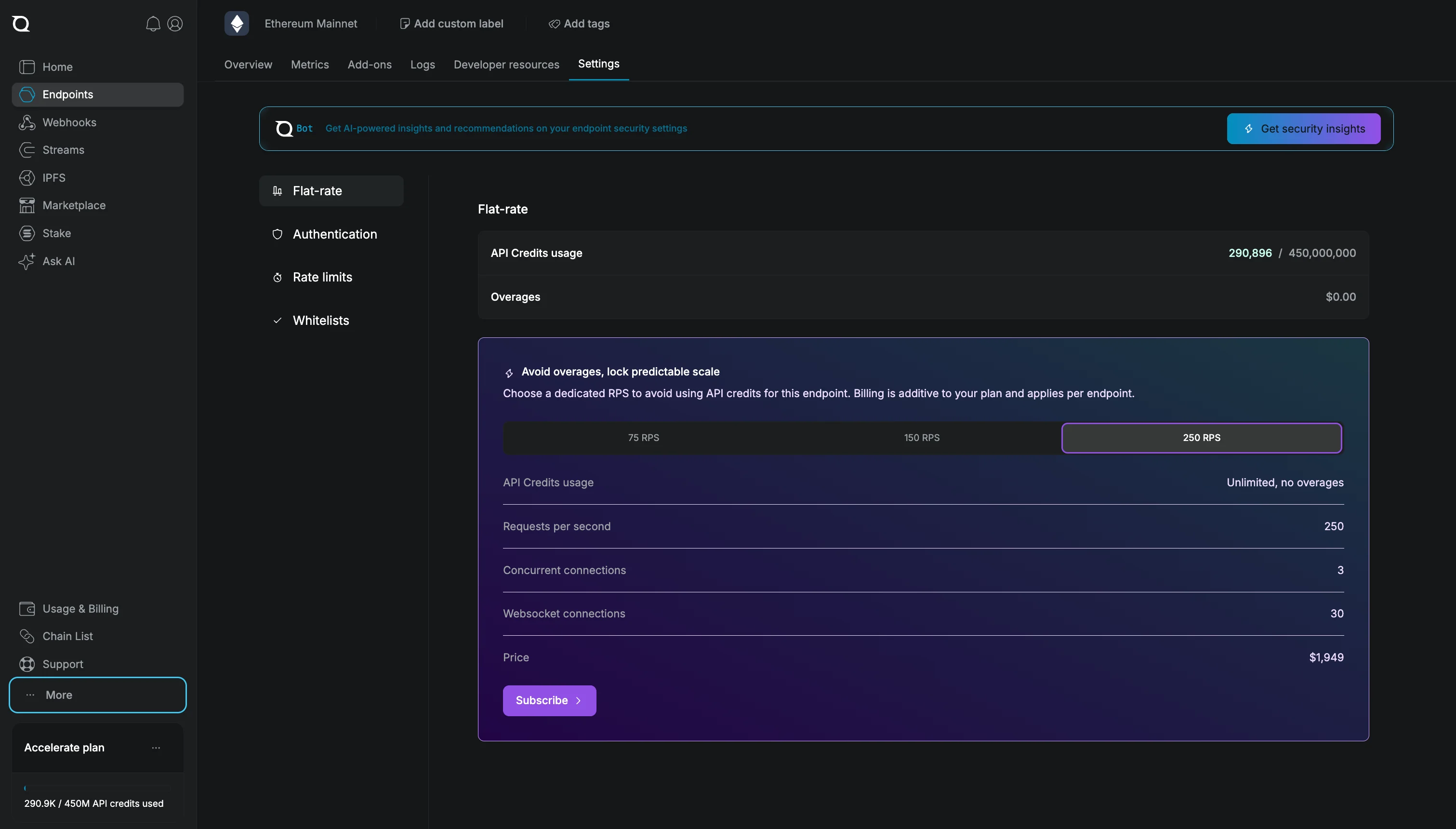
Step 4: Select your tier – Choose your RPS tier based on your capacity needs. The interface shows concurrent connections, WebSocket connections, and monthly pricing for each tier.
Step 5: Configure and subscribe – Click Subscribe, select your region (US East, EU Central, or APAC NE), review your configuration, and confirm.
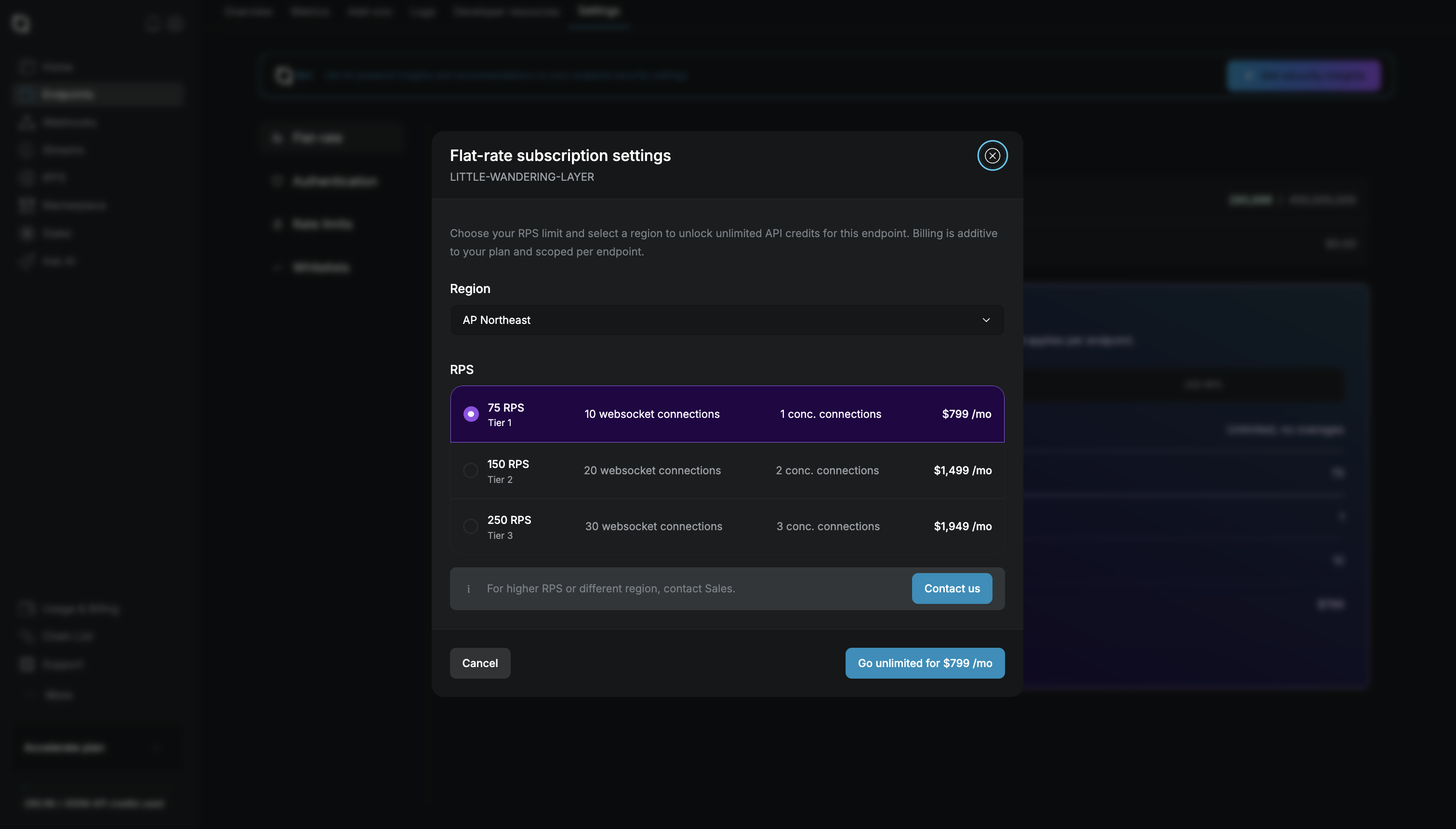
Your endpoint activates immediately with no provisioning wait time. Billing starts right away, and your configured RPS and concurrent connection limits apply to all requests.
Region changes: You can change your endpoint's region anytime from the endpoint settings page. Changes take effect immediately.
For Enterprise Accounts
Enterprise accounts should contact sales@quicknode.com to activate Flat Rate RPS.
How to Cancel the Flat Rate Subscription
Standard: Dashboard → Select endpoint → Settings → Flat-rate section → Click "Cancel flat-rate subscription". The endpoint remains active until the end of the current billing period.
Enterprise: Contact your account manager at sales@quicknode.com to process cancellations or contract changes. Terms depend on your Enterprise agreement.
Frequently Asked Questions
Are there overage charges if I exceed my RPS limit?
No. Requests that exceed your RPS or concurrent connection limits receive HTTP 429 (rate limited) responses. There are no additional charges.
Can I change my tier after activation?
Yes. You can upgrade or downgrade your tier at any time from the endpoint settings in the Dashboard.
Can I use Flat Rate RPS for multiple chains or regions?
No. Each Flat Rate RPS subscription covers one endpoint on one blockchain in one region. To cover multiple chains or regions, you would need a separate subscription for each.
Can I change my region after subscribing?
Yes. You can update your endpoint's region at any time from the endpoint settings page. Click the pencil/edit icon next to your region selection. Region changes take effect immediately, and your endpoint's DNS will be updated to route traffic to the new region.
Does Flat Rate RPS include archive node access?
Yes, where available. Heavy archive queries (large eth_getLogs ranges, debug/trace methods) may hit concurrent connection limits quickly due to long processing times. Workloads dominated by archive queries may require higher concurrent connection limits or Dedicated infrastructure.
Can I switch from credit-based billing to Flat Rate RPS?
Yes. Navigate to your endpoint settings in the Dashboard and select the Flat Rate RPS plan that fits your needs. Billing will switch at your next billing cycle. Note that credit-based and Flat Rate RPS billing cannot run simultaneously on the same endpoint.
Can a user have a credit-based (QN plan) and a flat rate endpoint on the same account?
Yes. You can have both credit-based endpoints and Flat Rate RPS endpoints on the same account. Each endpoint is billed independently and can use either credit-based billing or Flat Rate RPS. However, a single endpoint cannot use both billing types simultaneously—you must choose one billing model per endpoint.
Can I have multiple Flat Rate RPS endpoints on the same account?
Yes. You can activate Flat Rate RPS on multiple endpoints, each with its own tier, chain, and region. Each endpoint is billed separately as an independent subscription.